Stop re-searching the same commands.
Keep reusable shell commands organized and ready when you need them.
Remember less. Reuse more.
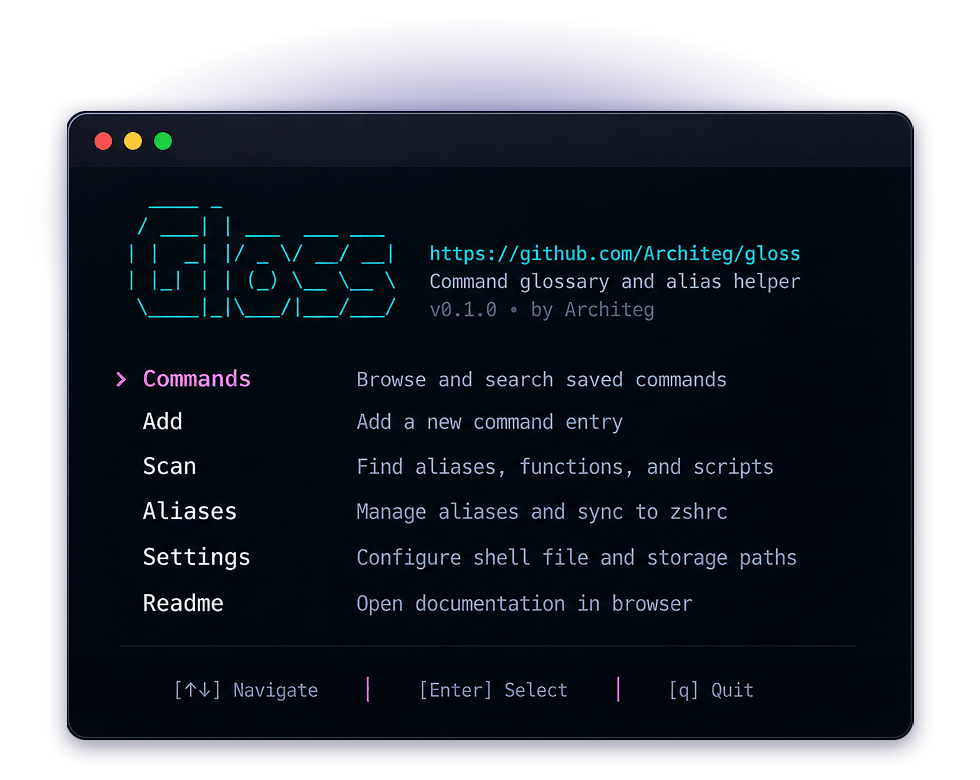
Gloss is
Open source Local-first macOS + Linux zsh + bashFeatured in



Your shell history is not a knowledge base.
It remembers what you typed, not why it mattered.
Commands get buried
One-liners, SSH tunnels, Docker cleanup commands, and Git tricks disappear into thousands of history entries.
Aliases become config clutter
.zshrc/.bashrc slowly turns into a pile of shortcuts with no descriptions, no tags, and no easy way to review changes.
Notes are too far away
Commands saved in notes, bookmarks, and README files are not where you need them: inside the terminal.
You keep re-searching commands
You keep looking up the same Git, SSH, Docker, server, and deployment commands instead of saving them once.
Gloss keeps reusable commands close to your terminal.
Save them with context, find them by tag, and sync aliases safely without turning your shell config into a junk drawer.
- Save commands with descriptions and tags.
- Find commands by keyword or tag.
- Scan zsh and bash configs for aliases, functions, and scripts.
- Import only the suggestions you choose.
- Preview alias changes before writing to your shell config.
- Sync aliases inside a dedicated managed block with backups.
Command memory, organized.
Save reusable commands with descriptions and tags, then browse, search, and filter them in a clean terminal UI.
- Save commands with descriptions and tags
- Browse entries grouped by tag
- Find commands by keyword or description
- Filter by exact tag
# existing shell config above...
# >>> gloss aliases >>>
# <<< gloss aliases <<<
# existing shell config below...
Backup saved → ~/.zshrc.gloss.bak-20260423-223500
Backup saved → ~/.bashrc.gloss.bak-20260423-223500
Aliases without the shell config mess.
Gloss previews the exact alias block before syncing and only updates the section it manages in your zsh or bash config.
- Add aliases without auto-syncing
- Preview the generated alias block
- Replace only the Gloss-managed block
- Leave unrelated shell config content untouched
- Create backups only when sync changes a file
Build your glossary from what you already use.
Gloss scans your detected shell config and configured paths, finds aliases, simple functions, and executable scripts, then lets you import only the useful ones.
- Scan zsh and bash defaults
- Detect aliases, functions, and scripts
- Review suggestions before importing
- Skip entries already in your glossary
- Import selected items into your command library
Command memory in one place.
Six focused features. No extras. No bloat.
Command glossary
Save reusable commands with descriptions, tags, and context.
Search and filtering
Find commands by keyword, description, or exact tag.
Scan and import
Detect aliases, simple functions, and executable scripts from your shell setup.
Managed aliases
Add, preview, and sync aliases inside a dedicated block in your zsh or bash config.
Safety by default
Create backups only when sync actually changes an existing shell file.
CLI + TUI
Use the TUI for browsing and importing, or direct commands for quick workflows.
Three commands to get organized.
Start small, then build your command library naturally as you work.
Add a command
Save a reusable command with a description and tags.
gloss add Find it later
Recall the exact command without leaving the terminal.
gloss list --tag git Sync aliases safely
Preview and sync managed aliases without touching unrelated zsh or bash config.
gloss alias sync
Prefer the TUI? Run gloss to browse, add, scan, import, and manage aliases interactively.
Install Gloss
Install Gloss on macOS or Linux and start building a local command library.
brew install Architeg/tap/gloss
Compatibility
Gloss supports the default shell workflows it is built around: zsh on macOS and bash on Linux.
macOS
Officially supportedLinux
Officially supportedzsh / bash
Primary shell workflowWindows
Not supported yetWhy not just shell history?
Shell history is useful, but it was not designed to be your command library.
Shell history
Useful for recent commands. Poor for descriptions, tags, and long-term recall.
Aliases
Fast for shortcuts. Not built for context, discovery, or review.
Notes apps
Good for documentation. Not where you work when you are in the terminal.
Gloss
GlossA local command library for saving, finding, importing, and safely syncing the commands you reuse.
Frequently asked questions
Quick answers about Gloss.
Is Gloss free?
Yes. Gloss is free to use and open source under the MIT license.
Does Gloss require an account?
No. Gloss runs locally and does not require a cloud account.
Where is my data stored?
Gloss stores your command and alias data locally under ~/.config/gloss/ by default.
Does Gloss edit my .zshrc or .bashrc directly?
Only when you choose to sync managed aliases. Gloss writes a dedicated alias block and leaves the rest of your shell file untouched.
Does Gloss create backups?
Yes. Gloss creates a backup when sync changes an existing shell file. No-op syncs do not rewrite the file or create unnecessary backups.
Can I use it without the TUI?
Yes. You can use direct CLI commands such as gloss add, gloss list, gloss scan, gloss edit, gloss delete, and gloss alias sync.
Does it work on Linux?
Yes. Gloss officially supports Linux with bash, including ~/.bashrc and ~/.bash_aliases scan defaults.
Does it work on macOS?
Yes. Gloss officially supports macOS with zsh, including ~/.zshrc scan defaults.
Does it support Windows?
Not officially in v1.
What is Gloss not?
Gloss is not a shell replacement, history analyzer, package manager, AI command explainer, or cloud sync product. It is a small local utility for documenting and managing useful commands.
Project at a glance
Open, transparent, and easy to inspect.
- 100%
- Open source
- 4
- Release builds
- 0
- Cloud accounts
- 0.1.1
- Current version
MIT license, public repo
macOS and Linux binaries
Local-first by design
Major Update
Stop re-searching the same commands.
Keep reusable shell commands organized, close to your terminal, and ready when you need them.
More from WorksFine
Focused tools for cleaner Mac and terminal workflows.
Writor
Fix your writing anywhere on your Mac, in any app or text field.
- macOS
- Writing
- AI
CmdScope
Turn shell history into visual insights, patterns, and time-saving alias suggestions.
- CLI
- Shell analytics